We had a similar rotation on Chrome team for merges from WebKit (pre fork), and it was similarly a lot of work and clunky tooling!
A few times in my career (including this one) I have thought, "We are sure going to a lot of effort to maintain a modified copy of that code while also preserving our changes atop it as we sync, and this is exactly the kind of workflow that Git was designed to enable." Like, the Linux kernel dev workflow is all about different maintainers maintaining different branches and merging between them, and that is where Git comes from.
So in a setting other than Chrome I have tried out using Git to try to manage these sorts of situation. I have found in practice many engineers aren't comfortable enough with Git to have it end up helping them out tooling-wise. This is disappointing but also not too unexpected given Git's UI.
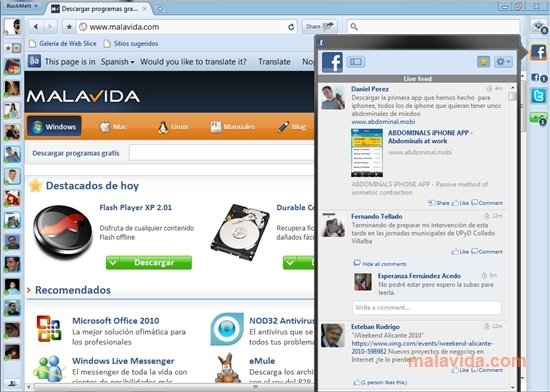
I worked at Rockmelt from 2009 till it was acquired by Yahoo. You've never heard of it, but we had a browser built on-top of Chromium that had built-in integration with Facebook, Twitter, Posterous, RSS feeds, everything social of the day:
I was our build/release engineer. One of my jobs was keeping our code rebased on-top of Chromium.
It wasn't terribly painful but I could always tell when a new engineer joined Chromium because they'd inevitably rewrite some major component and there'd go my day porting our code onto the rewrite. (I did more than just resolve merge conflicts. I also took a first pass at updating our code before handing it off to the rest of the team.)
We were using git from the beginning. Chromium was using svn then, but Google had an official git-svn mirror and I worked from that.
It's been a while, but I recall that I switched us from working off the tip-of-trunk to working off of release branches. That became feasible when Chromium switched to its more frequent release schedule (2 weeks I think?).
I don't understand any developer's that aren't willing to put in the time to learn how to use Git - to me, it's the single greatest tool available to enable productivity and confidence in changing code. There's no shame in using any one of the many GUI interfaces for Git that make the process simple and intuitive but even with the CLI, there are only a small handful of commands that I regularly need to use to do all the work of managing branches, merges, rebases and resets; and a lot of the time, there's more than one way to do any particular operation.
> I don't understand any developer's that aren't willing to put in the time to learn how to use Git
I can effectively use, I don’t know, probably the about 5% of git that I need to do my job. It could maybe benefit me to learn 5% more? The rest feels like a trivia rabbit hole, I have shit to do, and I already have a lot of difficulty with cognitive load and far too many yaks to shave daily. With that said, I have no strong disagreement with you, but I do want to add a bit of nuance: “learn how to use git” is extraordinarily open-ended, and one of the most challenging parts is to know where to even start. Or continued learning has any practical benefit.
A little less nuanced: I encourage everyone who will listen, even experienced devs, to use a GUI frontend. Not just because GUIs do ~90% of what you’ll normally need in a daily workflow (which is especially good for noobs who learn which things are important to know first). Also because the GUIs generally have really obvious cues for how to unfuck a mistake, which is the most difficult thing for people who aren’t already well adjusted to git. I use a git GUI for almost all of my version control tasks, and I’m much more effective for it.
I’ve learned more how to use the git CLI for an art project than I’ve ever needed to know for normal work processes.
(Self nit: bullshit made up approximately educated guess percentages)
This (and the reply to js2) gives me the impression that "effectively use 5% of git" means something like "effectively use 5% of the git CLI surface", but to me that's not what "learn how to use git" means.
One way or another, I've wound up becoming the git guy at work, and think I'm on the more proficient side of average. But, for most anything outside of commands I use daily (or can easily find in shell history), I'm off to the git docs or a search engine. Just about always, I know what I need git to do, it's just a matter of finding an incantation to do it.
To me, there are two pieces to learning git. The lower level is about git itself: understanding that commits are snapshots and the diffs are calculated on-the-fly, that cherry-pick is an automated version of diff and patch, rebase is like a way to compose cherry-picks. The other layer is about how the organisation uses git - like how to fork a project on github, push some changes to a branch in your fork, make a PR to propose those changes to upstream, why committing directly to main is a bad idea.
> understanding that commits are snapshots and the diffs are calculated on-the-fly
I never understood why that gets mentioned as essential for understanding git. A version control system has to be able to produce both all versions of a given file and diffs between versions of a file, but how it does that is an implementation detail. There are many options there: full first version with diffs to newer versions, full last version with diffs to older versions, variants of those with full versions inserted every now and then, mixes of forward and backward diffs (as is done in some video formats, if you see each frame as a version of a file), etc.
Of course, there may be performance reasons for choosing an implementation. I could understand statements such as “Because of the existence of merge commits, it’s easier to store full files, rather than diffs, as a merge commit would have diffs with each of its parent that must be kept consistent”, but the “understanding that commits are snapshots” claim isn’t about implantation details, but claimed to be essential to understand git.
That's a good question, and I don't have a straightforward answer.
I think git sits in a sort of uncanny valley, where it's possible to go a long way treating the tool as a black box (and you're totally right - snapshots vs diffs is an implementation detail), but in practice, to really "get it" it's necessary to understand a bit about what is going on under the hood. The problem space that git addresses is inherently difficult, in contrast git internals are quite straightforward.
So, a person wanting to learn git has two options: they can keep the hood closed, study the manual, and fret over all the complicated looking knobs and switches. Or, they can have a look under the hood, realise that there really isn't much to it. Most of those controls just aren't relevant to do what they need to do at the moment, and when a problem arises they have a much better idea of where to look for solutions.
In my experience, being a well-rounded software engineer (for instance able to collaborate with a team at work, and make the occasional PR to random outside projects) requires a certain level of git proficiency. At that level of proficiency, the black-box approach seems to have a much steeper learning curve than the look-under-the-hood approach.
At a less philosophical level: git is a collaboration tool, and people get hopelessly confused about this stuff when they try to collaborate without sharing a common language. "How do I email a commit?" is the sort of question I get asked occasionally.
> “learn how to use git” is extraordinarily open-ended, and one of the most challenging parts is to know where to even start.
It's not really. It seems like it is because it has a baroque CLI with a ton of commands and those commands all have a ton of switches and the same commands can do lots of different things.
But under that atrocious CLI git is very elegant and simple conceptually. Once you understand the underlying concepts (blobs, trees, commits, refs, index/stage) the rest flows naturally.
Now I've been working with it since its earliest days including contributing to it here and there, but I never really found it very hard to grok.
"Git from the bottom up" is dated but git hasn't changed conceptually since then. "Git for computer scientists" is another good one. But any of the tutorials that start with git's low-level concepts and build from there are where I'd start.
> It's not really. It seems like it is because it has a baroque CLI with a ton of commands and those commands all have a ton of switches and the same commands can do lots of different things.
Do you want to be right or do you want to win? I was trying to remain sympathetic to your concerns while offering an alternate approach to learning git you might not have considered. I don’t have any trouble with git’s CLI but I understand why people find it frustrating. That is all.
I’ve yet to meet anyone using git command line in their day to day activity. Everyone’s just using IDE. So IMO git CLI is not the issue in most scenarios. You might want to have git guru in your team to resolve some particularly hard situations, but that should be an exceptional situation.
Inversely, I don't think there's a single developer in my work center that routinely uses git anywhere but the CLI. I think CLI git usage may be more common than you believe.
To be clear, I think many developers are comfortable enough with the small handful of commands most regularly use. For the more advanced case of maintaining a fork of a high-velocity codebase like WebKit, it's likely you'll need a deeper understanding of remotes and how to manage complex rebases, especially in the presence of lots of conflicts. And possibly some fancier tools like git-subtree. In particular in WebKit my recollection was it was common to patch something locally and eventually take it upstream, but after upstream's requested modifications the patch would eventually come back around and conflict with itself.
> I don't understand any developer's that aren't willing to put in the time to learn how to use Git
It’s not like git invented version control or even distributed version control. Stuff predated git and git wasn’t even the only solution that was coded together when BitKeeper changed license terms (personally, I wish Mercurial had won because it has a much better interface, but what won won and I’m happy enough with git to not really care).
Putting all that aside, systems and codebases have their own workflows for a reason. I’m sure the reason WebKit was on SVN for so long wasn’t because the committers weren’t willing to use git (we’ve seen in this comment thread revelations by former Apple engineers who admit that they maintained a shadow git-based codebase internally), I’m sure almost everyone involved uses git. But for whatever reason, there were blockers to migrating (and some of those are explained in the WebKit blog).
Now, as an outsider, I might think that waiting this long to migrate to git, a solid decade after it made sense to do so, is odd. But I don’t have the context. I don’t know the reasons why, and for what it’s worth, the git-svn mirrors seemed to be working well for the people working on the project.
WordPress, a much more active open source project, at least in terms of outside contributors, is also still on SVN. Like WebKit, most contributors work on the git mirrors rather than using SVN. As an outsider, I can also think that it’s ridiculous for that project to still be on SVN, but again, I don’t know the context. I don’t know the blockers, I don’t know the workflow considerations.
But I do feel confident that none of these decisions (or lack of decisions) were made because developers weren’t willing to learn git.
The problem is that you spend 95% of the time using it on the golden path; add, commit, push, maybe click a merge button somewhere. At least in my experience
So it can be hard to learn the hard parts by doing, because by the time you need to do them again, you've forgotten what you learned last time
I feel like you do need a bit of rigor, especially because rebases and the like often don't do what you intuitively want, leading to merge conflicts over and over again when trying to clean things up.
Even small stuff like not knowing to enable rerere means that rebases have incidental complexity compared to, for example, outright recreating commits in another spot.
I disagree with most people about mercurial being "better" (I love my staging area), but doing stuff with git in practice can be super duper fiddly. I've found it's much nicer to do the right thing with stuff like magit though. I bet there is a great UI that is yet to be built for most people that makes it easier to do stuff like "updating old commits" or other things that you end up having to do through rebases.
I use the bare minimum of it and am not happy. I’m sure it’s a great fit for the Linux kernel, but for a sole developer or small team, not so much.
I’d rather just have several independent file system snapshots of a particular folder + logs. I’d like to rewrite history easily. But that ship has long sailed.
In this case, was it really working? It sounds like they had enough friction to make considering alternatives reasonable.
In general, I agree with your point but I think there's a very pragmatic argument that the open source world heavily converging on Git means it's worth knowing even if it's not your primary tool. In the 2000s that was spread out more with CVS, SVN, Mercurial, etc. also being good candidates depending on what communities you worked in but it's been quite a while since I've seen even Mercurial being used in the wild.
I'm totally willing to learn the magic of advanced merging, but most "tell me more about Git" talks/articles rather want to tell me more about its general internal structure, which I find very far removed from actually using it.
So what's the best resource for learning more about using Git?
Personally, I found https://learngitbranching.js.org/ surprisingly helpful for getting a mental model of Git usage, even though I had already been using Git for a couple years. As always with learning resources, YMMV.
The amount of developers who don’t know about “bisect” alone makes me sad. Such a powerful tool especially when you’ve got a good replication of a bug in some kind of test-like thing you can run.
We've been working on a migration from SVN to Git (since 2019, still going strong!) and, since our workflows are all built around SVN assumptions and SVN workflows, it has served only to make everything more complicated and more finicky than it would have been.
I'm looking forward to doing more modernizing of things over time, but for now most of our work is trying to map SVN semantics and structures onto Git, and dealing with weird tooling issues.
Case in point, the Git SCM branch source that the Jenkins multibranch plugin uses; all we need to filter on is branch name, which you can get from `git ls-remote <remote>`, but because of the way it's designed it actually clones the entire repository (between 4 and 12 GB) and then checks the branch list. Nightmareish.
Still, a lot of stuff works a lot better, and now we have more and more developers and teams testing out or using Gitlab's features, like merge requests, and more and more projects trying to modernize their approach with CI builds and the like. It's a very exciting time.



A few times in my career (including this one) I have thought, "We are sure going to a lot of effort to maintain a modified copy of that code while also preserving our changes atop it as we sync, and this is exactly the kind of workflow that Git was designed to enable." Like, the Linux kernel dev workflow is all about different maintainers maintaining different branches and merging between them, and that is where Git comes from.
So in a setting other than Chrome I have tried out using Git to try to manage these sorts of situation. I have found in practice many engineers aren't comfortable enough with Git to have it end up helping them out tooling-wise. This is disappointing but also not too unexpected given Git's UI.